Hey I'm a teenager, and like all other teenagers, I require privacy, a wish that is not respected in my household. I happened to have an Arduino Uno collecting dust in my bookshelf and figured, what the hell, let's try this. I wanted to make something that would somehow alert my laptop in my room that someone was approaching my room, maybe over LAN? Or Bluetooth? The first idea that came to my mind was an ultrasonic sensor, something that's used to measure distance from an object by emitting sound of a frequency that's too high, and measuring the time it took the sound to bounce back from the object . I could constantly monitor the output for changes. I'd need to erect it in such a way that it's facing another wall, in its maximum distance range, so that if someone walks past it, the measured distance would decrease for a second. Luckily, there's a hallway leading to my room, and the other end, pointing perpendicular to the hallway, would be a perfect spot for my sensor. The circuit was simple enough, something like this
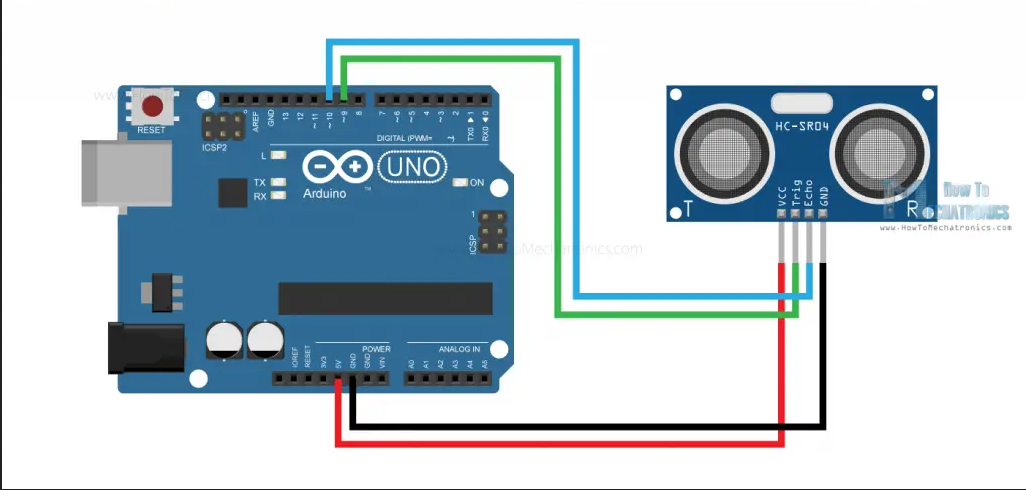
Here's the accompanying code
const int trigPin = 9;
const int echoPin = 10;
long duration;
int distance;

void setup() {
  pinMode(trigPin, OUTPUT);
  pinMode(echoPin, INPUT);
  Serial.begin(9600);
}

void loop() {
  digitalWrite(trigPin, LOW);
  delayMicroseconds(2);
  digitalWrite(trigPin, HIGH);
  delayMicroseconds(10);
  digitalWrite(trigPin, LOW);

  duration = pulseIn(echoPin, HIGH);
  distance = duration * 0.034 / 2;

  Serial.println(distance);
}
Now I had to figure out how I would communicate with my laptop. Then I remembered, I already had a computer, on which I run my media server sitting very close-by to where my sensor was placed, so I figured I could just take a moderately long wire and connect the sensor to the Arduino, connected to my computer, and tape the sensor on the wall. There also happened to be an almirah in between, which helped hide the ugly wires. Now I have to write a program on my server to constantly read from the Arduino, and notify my laptop over LAN. Ignoring the code used to set up a listening server, which my laptop would connect to, this is the code used.
struct client_ctx {
    int socket;
    std::string ipv4_address;
};

std::vector<client_ctx> clients;
std::mutex clients_mutex;

/* ... */


const char z = 1;
std::chrono::time_point<std::chrono::system_clock> t1, t2;

std::string line;
std::getline(serial, line); /* Ignore the first reading, might read 123
                               as 23, or 3 */
t1 = std::chrono::system_clock::now();
while (true) {
    int num;
    std::getline(serial, line);
    num = std::stoi(line);
    {
        std::lock_guard<std::mutex> lock(clients_mutex);
        t2 = std::chrono::system_clock::now();
        if (num <= 70 && std::chrono::duration_cast<std::chrono::seconds>(t2 - t1).count() >=3 ) {
            t1 = t2;
            std::cout << "MOTION\n\n" << std::endl;
            for (auto it = clients.begin(); it != clients.end();) {
                if (send(it->socket, &z, sizeof(z),
                         MSG_NOSIGNAL | MSG_DONTWAIT) <= 0) {
                    std::cout << it->ipv4_address << " disconnected"
                              << std::endl;
                    it = clients.erase(it);
                } else {
                    it++;
                }
            }
        }
    }
}
Before this, I'd just made it so that it'd invoke a command over ssh to the client computer, something like this
system("ssh <ip> \"mpv --volume=50 --end=1 --quiet /usr/share/sounds/freedesktop/stereo/alarm-clock-elapsed.oga"")
But since a connection had to be established each time, it created a delay, of about 2 seconds, between someone actually walking past the sensor and the notification coming in. The above server program eliminates that by keeping an open connection. This reduced the delay to about half a second. Notice how I've made it so that multiple clients can connected to the server, and all of them would be notified. I've also made it so that the time difference in between 2 subsequent notifications must be at least 3 seconds, so I don't receive duplicate signals. As for the client, I need to wait until the the server socket is ready to be read from, indicating the sensor outputted a value small enough to be a person, which the server detected and has written a byte to the socket. At this point, the client should invoke a shell script, which can then, for example, send a notification You can think of this chain of events like this: Sensor -> Server -> Client(Laptop) -> Shell Script -> Me This is what the client program looks like.
 char buffer[1024];
 ssize_t bytes_read;
 while ((bytes_read = read(socket_descriptor, buffer, sizeof(buffer) - 1)) >
        0) {
     std::cout << "MOTION\n\n" << std::endl;
     pid_t pid1, pid2;

     pid1 = fork();
     if (pid1 == 0) {
         // Child process
         execl("/bin/sh", "sh", "script.sh", NULL);
         perror("execl failed"); /* This line is reached if execl fails */
         _exit(1);               /* Exit child process with an error */
     } else if (pid1 > 0) {
         /* Parent */
     } else {
         std::cerr << "Fork failed: " << std::strerror(errno) << std::endl;
         std::exit(EXIT_FAILURE);
     }
 }

 if (bytes_read == -1) {
     std::cerr << "Failed to read from server: " << strerror(errno)
               << std::endl;
 }

 close(socket_descriptor);
In theory, this should be a perfect alert mechanism. Unfortunately, we do not live in theory. After putting the system up, for some reason, I kept getting false alarms. I checked the output of the sensor, and occasionally, it's output would dip below the threshold value of 70 centimetres and send a signal to my laptop. I still can't explain why this happened, but it did, so I needed a better idea.
I googled about some more sensors I could use, and came across the PIR sensor. Instead of measuring distance, a PIR sensor detects infrared radiation, which all warm blooded animals emit. This sensor, after switching to Repeat Trigger mode would output HIGH on its output pin for as long as it detects motion, and LOW otherwise. I'd have to overhaul my server and Arduino code for this.
/* person_detector.ino */
const int pirPin = 2;

void setup() {

    Serial.begin(9600);


    pinMode(pirPin, INPUT);
}

void loop() {
    if (digitalRead(pirPin) == HIGH) {
        Serial.println("1");
    }
    else {
        Serial.println("0");
    }
    delay(100);
}
/* server.cpp */
std::string line;
bool waiting = false;
const char z = 1;
while (true) {
    std::getline(serial, line);
    {
        std::lock_guard<std::mutex> lock(clients_mutex);
        if (line == "1" && !waiting) {
            waiting = true;
            std::cout << "MOTION\n\n" << std::endl;
            for (auto it = clients.begin(); it != clients.end();) {
                if (send(it->socket, &z, sizeof(z),
                         MSG_NOSIGNAL | MSG_DONTWAIT) <= 0) {
                    std::cout << it->ipv4_address << " disconnected"
                              << std::endl;
                    it = clients.erase(it);
                } else {
                    it++;
                }
            }
        } else if (line == "0" && waiting) {
            waiting = false;
        }
    }
}
The waiting variable is there so the server doesn't send a signal everytime the pin outputs HIGH, I only need it to send a signal once when the pin is HIGH, then wait until pin is LOW again, and repeat.
# script.sh

export DBUS_SESSION_BUS_ADDRESS=unix:path=/run/user/1000/bus
export DISPLAY=:0

# echo script_1000: $USER:$UID
mpv --volume=50 --end=1 --quiet /usr/share/sounds/freedesktop/stereo/alarm-clock-elapsed.oga &
Okay, this should work, in theory. Thankfully, theory agreed with practice this time, and it worked perfectly. The delay between someone actually walking past I'm particularly proud of this project, since it offers practical use.
End notes
Thank you for reading, I hope you gained at some sort of knowledge from this post, if not that, at least it kept you entertained for a few minutes. If you find an error, or simply wish to thank me, please do not hesitate to mail me at agastya.singh@live.com.